Admissions & enrollment
Capture learner details, previous-school history, guardian contacts, required documents and admission decisions in an organized record.

GICT education technology
GICTSIMS is the GICT School Information Management System by GICT. Admissions, attendance, fees, assessment, e-learning and parent communication sit in one school record.
Modules, integrations and delivery timing are confirmed during school discovery.

GICT School Information Management System by GICT
School teams balance learner records, term dates, attendance, fee collection, assessment and parent questions. GICTSIMS keeps those workflows in one system, from primary school through university and technical training.
SchoolPay payments and MoES EMIS reporting are already connected. E-learning, the mobile app and parent messages sit beside the office records.
Capability map
Choose the modules that matter to your school. Scope and availability are confirmed during discovery.
Capture learner details, previous-school history, guardian contacts, required documents and admission decisions in an organized record.
Keep class placement, learner status, contacts, notes and school history accessible to staff with the right permissions.
Set up school years, terms, opening dates, promotion cycles and the structure used by each campus.
Organize grades, classes, streams and subject assignments, including different combinations where your school uses them.
Record daily class attendance, review absence patterns and prepare a consistent follow-up process with guardians.
Plan weekly lesson periods, classrooms and teacher assignments, with changes visible to relevant staff.
Set exam periods, record marks, configure grading rules and track assessment completion by class or subject.
Prepare learner progress summaries and support end-of-term review and promotion decisions.
Configure fee items by class, term or learner; record payments, discounts, instalments, balances and arrears.
Provide an auditable payment record and reconcile collections against agreed cash, bank or mobile-money processes.
Record approved scholarships, sibling discounts, staff-child rates and other fee adjustments with an audit trail.
Link several learners to one guardian account and give families a clear view of school notices, attendance and balances.
Send notices, fee reminders, attendance alerts and report updates to guardians by SMS, email and WhatsApp, with a record of what each family received.
Maintain staff records, subject or class assignments, role permissions and agreed attendance or leave workflows.
Track books, issue and return activity, and share approved homework, syllabus and study materials.
Plan boarding houses, rooms and student allocation, with the school’s pastoral and welfare process in view.
Keep route, vehicle and driver information together and define how transport updates reach families.
Record routine expenses, inventory and supporting approvals for clearer operational reporting.
Review class lists, attendance, fee balances, exam performance and collection summaries; export formats are agreed at scoping.
Define role-based access, data handling, retention, backups and recovery responsibilities before rollout.
SchoolPay payments reconcile to learner accounts, and school data is reported through the Ministry of Education and Sports EMIS portal.
Publish lessons, assignments, quizzes and learning materials so students can study from class or from home.
Give staff, students and parents a phone app for attendance, fees, results, notices and learning on the move.
Record incidents, merits and follow-up so heads of school can see patterns without a separate register.
Issue admission letters, report cards, leaving certificates and academic transcripts from the learner record.
Log visitors, enquiries and phone messages so the reception desk and administration stay in step.
Keep clinic visits, allergies and welfare notes available to authorized staff.
Track teams, clubs and participation alongside the academic timetable.
Run more than one campus with shared rules and campus-level classes, fees and reports.
Let families start an application online, upload documents and track the admission decision.
Feature catalogue
GICTSIMS covers admissions through e-learning, the mobile app and parent communication for primary, secondary, tertiary, university and technical schools.
Why schools consider GICTSIMS
Terms, fee structures, class streams and family communication shape the system, not the other way around.
Designed for primary and secondary terms, tertiary semesters, university faculties and technical workshops.
Use admissions, attendance and fees first, then add e-learning, the mobile app, library, boarding or transport.
Fee payments from SchoolPay reconcile to learner accounts, and school records report through MoES EMIS.
Guardians link siblings, receive SMS, email and WhatsApp updates, and check attendance, fees and results on the mobile app.
Teachers, bursars, heads and administrators each see only the information and actions relevant to their role.
Define data retention, backup responsibilities and recovery processes before any real learner records are loaded.
Beyond the office
GICT School Information Management System by GICT reaches the classroom, the phone and the family, not only the school office.
Teachers publish lessons, assignments, quizzes and files. Students open the work from school or from home and submit it in the same record as their class.
Staff, students and parents use the GICTSIMS app for attendance, fees, results, notices and learning without waiting to reach a desktop.
Guardians receive SMS, email and WhatsApp updates for fees, absence and results, and can see every sibling linked to their account.
Who it serves
The same GICTSIMS system is configured for primary, secondary, tertiary, university and technical schools.
Class placement, subject timetables, assessment marks, report cards and parent notices across terms.
Stream and subject combinations, exam grading, promotion rules and learner transcripts.
Programme structures, course units, continuous assessment and progression across semesters.
Faculties, departments, course registration, transcripts and semester results.
Trade modules, practical assessment, workshop attendance and industry-aligned records.
Connected to the wider school ecosystem
Fee payments and Ministry reporting run through GICTSIMS. Schools sign in with their own SchoolPay and EMIS access.
 Live integration
SchoolPay collections post to the right learner account. Bursars see the payment reference, the amount received and the balance that remains.
Open SchoolPay ↗ Live integration
Learner, staff and enrolment records are prepared for the EMIS portal so the school can submit Ministry of Education and Sports reports from the same system.
Open the EMIS portal ↗Built around Ugandan school priorities
School systems need to support the daily work of teachers, bursars and administrators while giving families clear, appropriate information.
Features and integrations listed here are planning directions. Availability, pricing and delivery stages are confirmed with each school during discovery.
GICTSIMS workflows
These screens show the GICT School Information Management System by GICT: admissions, fees and examinations in the same learner record.
Capture admission information, place the learner in the right academic structure, record guardian contacts and link siblings. Schools can agree the minimum required fields and documents for each intake.
Open a GICTSIMS role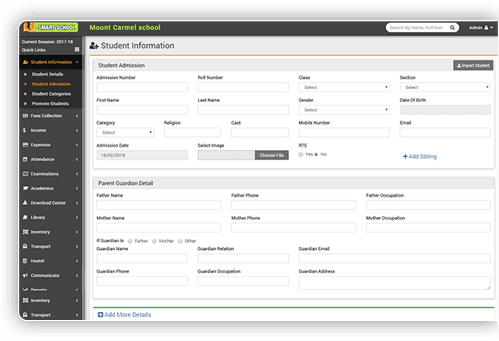
Set fee items and approved adjustments, record payments and give authorized staff a clear view of amounts billed, collected and still due. Reconciliation rules are agreed with the school.
Open a GICTSIMS role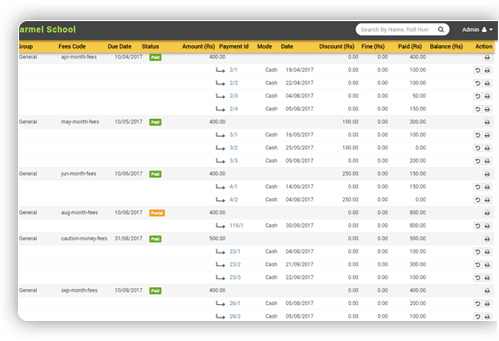
Organize exam periods, enter marks, apply the school’s grading rules and prepare progress summaries for staff and families to review.
Open a GICTSIMS role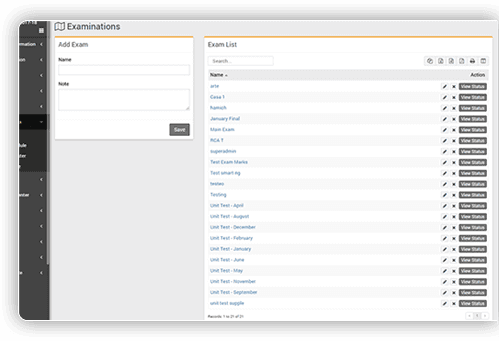
GICTSIMS roles
Choose a role to sign in. Super admin, staff, students, parents and specialist desks each see the work that belongs to them.
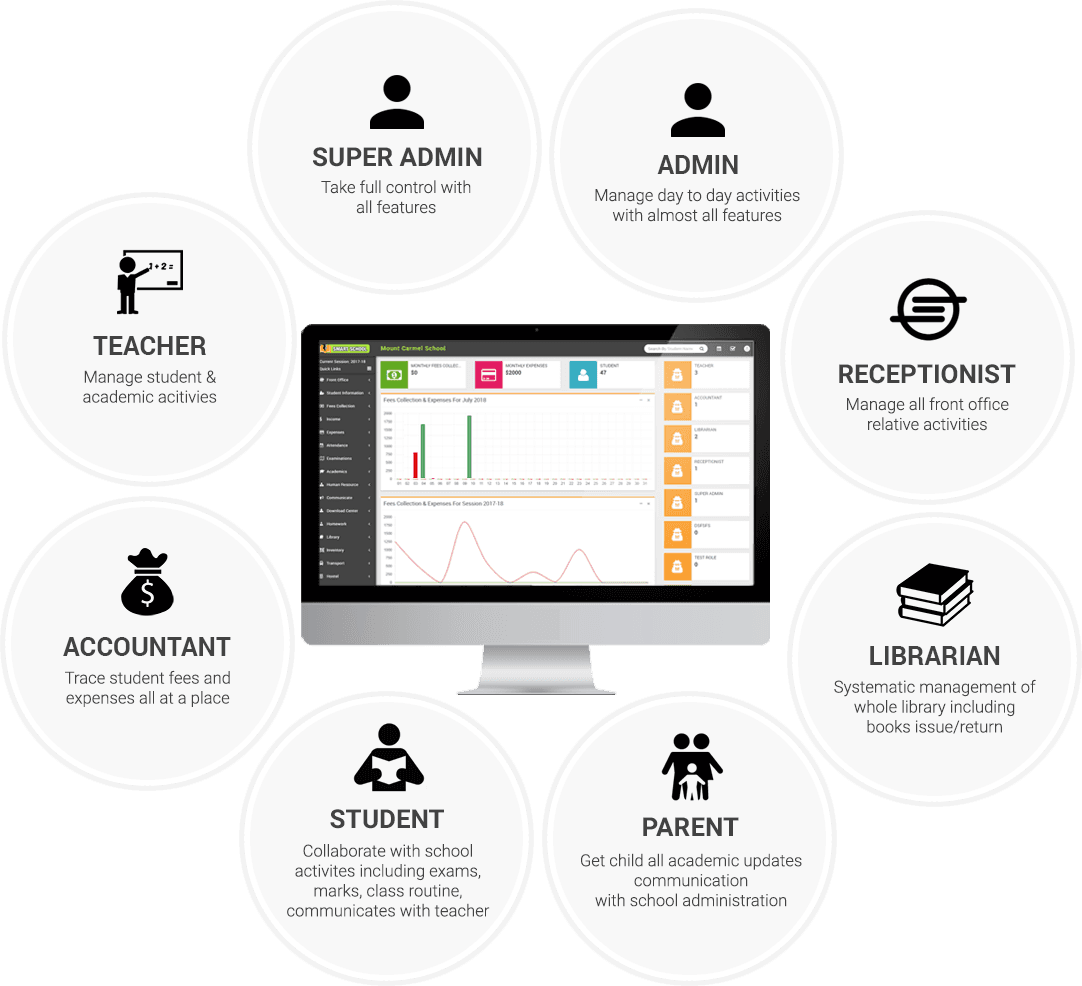
GICTSIMS role login
Each button opens the GICTSIMS sign-in for that role.A practical school rollout
Schools have fixed term calendars and limited time for change. Plan a safe first step around the academic calendar and staff capacity.
Map how admissions, class lists, attendance, fees, exams and parent communication work today. Identify paper registers and spreadsheet hand-offs.
Choose priority modules, user roles, reports, fee rules and integrations. Start with the workflows that save staff time or improve follow-up.
Review data quality, import needs, device access, permissions, training, backups and the school calendar before the first term goes live.
Test with a selected class, campus or term process. Correct issues with staff feedback before extending the rollout.
A considered implementation
Deployment plans should fit the school’s people, calendar, devices and responsibilities.
Campuses, classes, streams, terms, fee rules, grading and reporting formats.
Import review, guardian relationships, staff access, privacy controls and retention.
Browser and phone access, shared-device practices, network assumptions and support arrangements.
Role-based training, school champions, handover materials and an agreed support route.
Questions from school leaders
Need to discuss a specific fee, attendance or reporting workflow? Talk with GICT ↗
This page describes a configurable GICT product direction. Available modules, delivery timeline, deployment model and support are confirmed after discovery; no live GICTSIMS demo is offered here yet.
Primary, secondary, tertiary, university and technical schools. Class structures, faculties, course units and practical assessments are configured to the institution.
Yes. The parent account and mobile app show notices, attendance, fees and results, and SMS, email and WhatsApp carry the alerts the school sends.
Payment recording and reconciliation can be planned around the school’s current process. Direct mobile-money collection depends on provider access, approval and integration scope.
No direct UNEB or government integration is promised on this page. Any external connection must be verified with the relevant system owner and scoped separately.
Migration can be assessed after reviewing data format, quality, consent and history requirements. The school approves mapped records and validation before a production transfer.
A deployment should define staff roles, access rules, audit history, backups, retention, incident handling and applicable privacy obligations before real learner data is loaded.
Price depends on the school structure, modules, migration, integrations, hosting and training. GICT will confirm a written scope and estimate before work starts.
Yes. Testing with a selected class, campus or term process is recommended before extending the rollout to the whole school.
Role-based training for teachers, bursars and administrators is part of scoping, with school champions and handover materials agreed before launch.
GICT / EDUCATION SYSTEMS
We’ll map the priority workflows and help you decide what a useful first release should include.
Request a GICTSIMS scoping session